Overview
GPO reports generate කරන එකෙන් domain එකක Group Policy audit, document, සහ troubleshoot කරන්න උදව්. PowerShell එකේ Get-GPOReport සහ GPResult වලින් policy settings වල detailed HTML හෝ XML reports හදනවා. මේ guide එකෙන් ඒ ආකාරය පෙන්නනවා.
PowerShell එකෙන් detailed Group Policy reports generate කරන්න.
Key Takeaways
- Get-GPOReport එකෙන් GPO එකක settings document කරනවා; GPResult එකෙන් applied (resultant) policy පෙන්නනවා.
- Reports HTML (readable) හෝ XML (machine-parseable) විදිහට export කරන්න පුළුවන්.
- Group Policy module (RSAT එකේ කොටසක්) ඕන.
- Appropriate rights එක්ක domain-joined machine එකක run කරන්න.
පටන්ගන්න කලින්
- RSAT / GroupPolicy PowerShell module එක install කරන්න.
- Domain permissions තියෙන administrator විදිහට PowerShell run කරන්න.
- Module එක import කරන්න: Import-Module GroupPolicy.
GPOs ඔක්කොම List කරන්න
1. PowerShell එක administrator විදිහට open කරන්න.
2. Run: Get-GPO -All | Select-Object DisplayName, Id
3. මේකෙන් domain එකේ හැම GPO එකක්ම ඒකේ name එකයි GUID එකයි එක්ක list කරනවා.
එක GPO එකක් ගැන Report කරන්න
1. HTML: Get-GPOReport -Name "Policy Name" -ReportType HTML -Path "C:\Reports\Policy.html"
2. XML: Get-GPOReport -Name "Policy Name" -ReportType XML -Path "C:\Reports\Policy.xml"
3. Settings කියවන්න HTML file එක browser එකක open කරන්න.
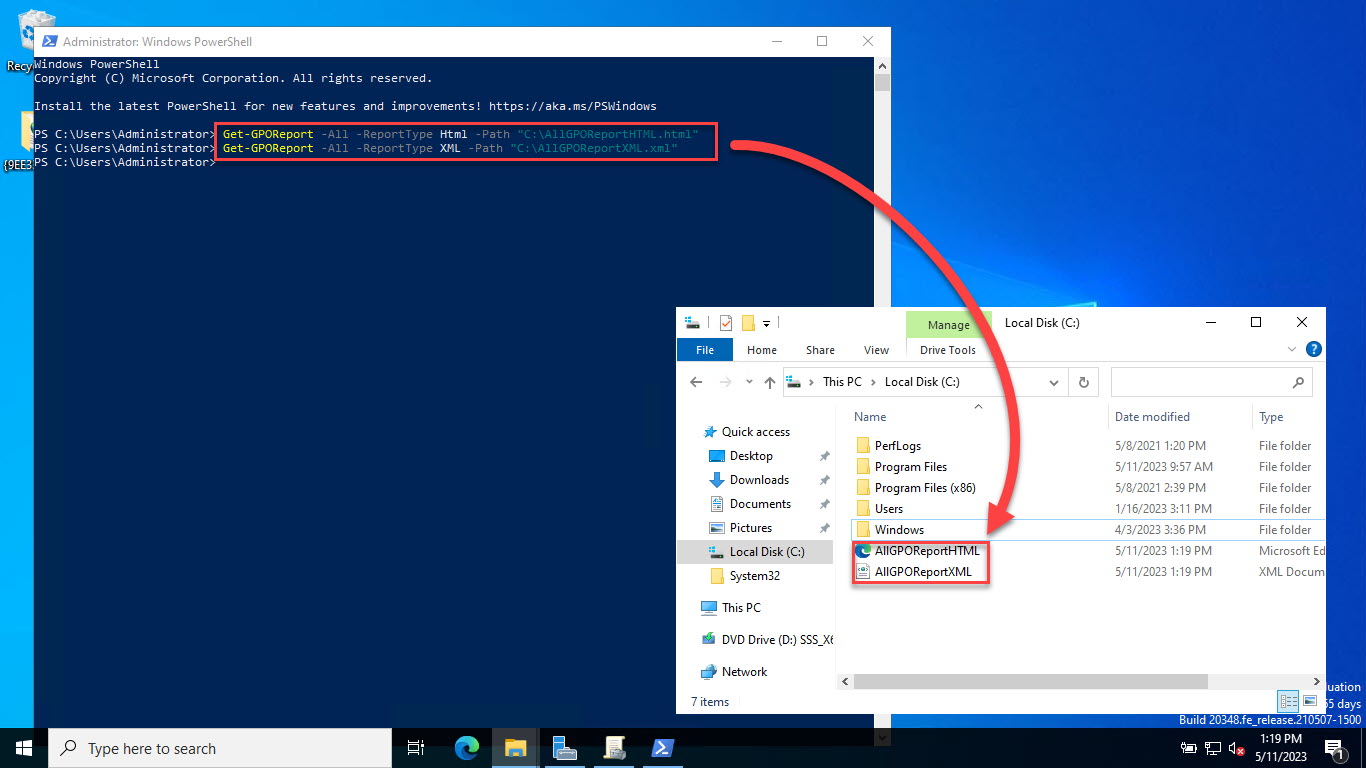
GPOs වලට HTML/XML report එකක් හදන්න.
GPOs ඔක්කොම ගැන Report කරන්න
1. එක combined HTML report එකක්: Get-GPOReport -All -ReportType HTML -Path "C:\Reports\AllGPOs.html"
2. Individual reports: Get-GPO -All | ForEach-Object { Get-GPOReport -Name $_.DisplayName -ReportType HTML -Path "C:\Reports\$($_.DisplayName).html" }
GPResult එකෙන් Resultant Policy
1. Current user/computer වලට applied policy බලන්න: gpresult /h C:\Reports\RSOP.html
2. කොයි GPOs ඇත්තටම apply වුණාද ඇයි කියලා බලන්න report එක open කරන්න.
3. Quick console summary එකකට gpresult /r පාවිච්චි කරන්න.
Troubleshooting
Problem: "Get-GPO is not recognized".
Solution: RSAT/GroupPolicy module එක install කරලා Import-Module GroupPolicy run කරන්න; domain-joined machine එකක ඉන්නවා කියලා බලන්න.
Problem: Reports generate කරනකොට Access denied.
Solution: Domain එකේ GPOs read කරන්න rights තියෙන account එකකින් PowerShell administrator විදිහට run කරන්න.
Problem: "Index was out of range" error.
Solution: GroupPolicy module/RSAT update කරන්න; මේ known bug එක අලුත් versions වල fix කරලා.
Problem: CSV එකට export කරන්නේ කොහොමද?
Solution: XML report එක (Get-GPOReport -ReportType XML) parse කරලා ඕන fields Export-Csv එකෙන් export කරන්න.
Conclusion
PowerShell එකෙන් Group Policy document කරන එක ලේසියි: GPO settings වල full HTML/XML reports වලට Get-GPOReport, resultant policy වලට GPResult පාවිච්චි කරන්න. ඕනෑම AD environment එකක audits සහ troubleshooting වලට ඒවා essential.
About SoftwareKey.lk
මේ guide එක SoftwareKey.lk Knowledge Base එකේ කොටසක්. තව step-by-step IT guides සහ support වලට softwarekey.lk එකට යන්න.