








Overview
Free Microsoft account එකකට එන්නේ OneDrive storage 5 GB ක් විතරයි, ඒක photos සහ documents වලින් ඉක්මනට පිරෙනවා. Microsoft 365 Developer Program එක කියන්නේ development සහ testing වලට generous OneDrive allocation එකක් (ඉතිහාසගතව user කෙනෙකුට 5 TB දක්වා) ඇතුළත් Microsoft 365 E5 subscription sandbox එකක් ලබාගන්න නීත්යානුකූල ක්රමයක්. මේ guide එකෙන් enrol වෙන්නේ කොහොමද කියලා පැහැදිලි කරනවා සහ තව storage වලට තියෙන අවංක routes ගැනත් කතා කරනවා.
Microsoft 365 subscription එකක් හරහා විශාල OneDrive allocation එකක් unlock කිරීම.
Note: Microsoft වරින් වර Developer Program එකේ terms වෙනස් කරනවා, eligibility එකත් renewal එකට ongoing development activity අවශ්යද කියන එකත් ඇතුළුව. හරියටම storage figure එක වෙනස් වෙන්න පුළුවන් දෙයක් විදිහට සලකලා, ඒක මත රඳා පවතින්න කලින් current program terms review කරන්න.
Key Takeaways
- standard free Microsoft account එකකට OneDrive storage 5 GB ක් ඇතුළත් වෙනවා.
- Microsoft 365 Developer Program එකෙන් build කිරීමට සහ testing කිරීමට අරමුණු කරපු E5 sandbox එකක් දෙනවා.
- subscription එක active විදිහට තියෙන තුරු sandbox එකට විශාල per-user OneDrive storage එකක් ඇතුළත් වෙනවා.
- විශ්වාසදායකව 1 TB හෝ වැඩිය ලබාගන්න ලේසිම ක්රමය paid Microsoft 365 Personal හෝ Family plan එකක්.
Join the Microsoft 365 Developer Program
1. official Microsoft 365 Developer Program page එකට යන්න සහ Microsoft account එකකින් sign in කරන්න.
2. "Join now" click කරලා country සහ company information ඇතුළුව ඔයාගේ details enter කරන්න.
3. prompt කරද්දී ඔයාගේ primary focus එකයි areas of interest එකයි තෝරන්න.
4. Microsoft 365 E5 sandbox type එක තෝරන්න (instant හෝ configurable).
5. ඔයාගේ අලුත් developer tenant එකට administrator username එකයි password එකයි set කරන්න.
6. phone number එකකින් සහ ඔයාට එවන code එකෙන් ඔයාගේ identity එක verify කරන්න.
7. sandbox එක provision වෙනකම් wait කරලා, අලුත් tenant එකට sign in කරන්න.
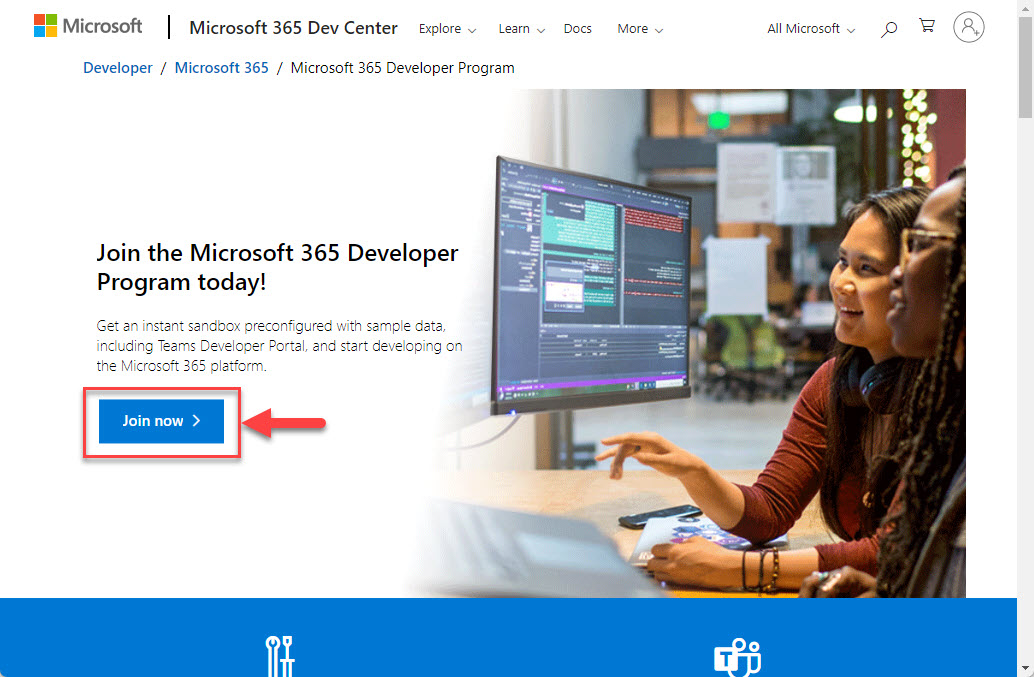
E5 sandbox එකක් හදන්න Microsoft 365 Developer Program එකට enrol වීම.
Tip: developer sandbox එක ඔයාගේ personal account එකෙන් වෙනම tenant එකක්. එහි OneDrive සහ අනිත් Microsoft 365 apps වලට access කරන්න අලුත් administrator credentials වලින් sign in කරන්න.
Other Legitimate Ways to Get More Storage
- Microsoft 365 Personal එකට paid subscription එකක් සමඟ OneDrive storage 1 TB ක් ඇතුළත් වෙනවා.
- Microsoft 365 Family එකෙන් අය හය දෙනෙක් දක්වා 6 TB ක් දක්වා (කෙනෙකුට 1 TB) share කරනවා.
- eligible institutions වල students සහ staff ලට ඒ අයගේ organisation එක හරහා අමතර OneDrive storage ලැබෙන්න පුළුවන්.
- වරින් වර එන Microsoft promotions සහ referral bonuses වලින් පොඩි free storage ප්රමාණ එකතු කරන්න පුළුවන්.
Warning: official Microsoft channels වලින් පිට free terabytes පොරොන්දු වෙන third-party "storage generators" හෝ tools වලින් වළකින්න. ඒවා නිතරම Microsoft ගේ terms උල්ලංඝනය කරනවා, ඔයාගේ account එකට හානි කරන්න පුළුවන්, සහ බොහෝ විට වැඩ කරන්නෙත් නෑ.
Troubleshooting
Problem: Developer Program එක මට join වෙන්න දෙන්නේ නෑ.
Solution: Eligibility rules වෙනස් වෙනවා සහ සමහර regions හෝ account types බැහැර කරලා තියෙනවා. personal Microsoft account එකක් පාවිච්චි කරන්න, ඔයාගේ details සම්පූර්ණ බව තහවුරු කරගන්න, සහ current program requirements review කරන්න.
Problem: මගේ sandbox subscription එක expire වෙලා storage එක අතුරුදහන් වුණා.
Solution: Developer sandboxes activity එකක් හෝ set period එකක් මත renew වෙනවා. renew කරන්න අවශ්ය qualifying activity එක complete කරන්න, හෝ lapse වෙන්න කලින් වැදගත් data permanent paid plan එකකට move කරන්න.
Problem: මගේ normal account එකේ OneDrive storage එක පේන්නේ නෑ.
Solution: storage එක ඔයාගේ personal account එකට නෙවෙයි, developer tenant එකට අයිතියි. access කරන්න enrolment එකේදී හදපු administrator credentials වලින් sign in කරන්න.
Problem: මට විශ්වාසදායක long-term storage අවශ්යයි.
Solution: Developer sandboxes testing එකට කරපු ඒවා, ඕනෑම වෙලාවක වෙනස් වෙන්න පුළුවන්. නැති කරන්න බැරි data වලට, paid Microsoft 365 Personal හෝ Family plan එකක් තෝරන්න.
Conclusion
Microsoft 365 Developer Program එකෙන් development සහ testing වලට විශාල OneDrive allocation එකක් access කරන්න නීත්යානුකූල ක්රමයක් දෙනවා, paid Microsoft 365 plans 1 TB හෝ වැඩිය වලට වඩාත් විශ්වාසදායක route එකයි. official channels හරහා enrol වෙන්න, subscription එක active තියාගන්න, සහ ඔයාගේ account එකට risk කරන unofficial tools වලින් වළකින්න.
About SoftwareKey.lk
මේ guide එක SoftwareKey.lk Knowledge Base එකේ කොටසක්. තව step-by-step IT guides සහ support වලට softwarekey.lk එකට යන්න.