Overview
Windows 10 හෝ 11 activate වෙලා නැති වෙලාවට, Personalization settings "You need to activate Windows before you can personalize your PC" message එකක් එක්ක greyed out වෙනවා. ඔයාට තාම workarounds කිහිපයක් පාවිච්චි කරලා wallpaper එක වෙනස් කරලා themes apply කරන්න පුළුවන්. මේ guide එකෙන් ඒක කරන හැටි පෙන්නනවා.
Personalization locked වුණත් themes සහ wallpaper apply කරන්න.
Note: මේවා personalization workarounds විතරයි. Windows activate කරන එකෙන් සම්පූර්ණ Personalization settings unlock වෙනවා, activation watermark එකත් අයින් වෙනවා — සම්පූර්ණ අත්දැකීමට valid licence එකකින් activate කරන එක ගැන හිතන්න.
Key Takeaways
- Activate නොවුණු Windows එකෙන් Personalization page එක lock කරනවා, නමුත් සියලුම personalization actions නෙවෙයි.
- Image එකක් මත right-click කරලා Set as desktop background තෝරලා wallpaper එක set කරන්න පුළුවන්.
- .theme හෝ .deskthemepack file එකක් double-click කරලා සම්පූර්ණ theme එකක් apply වෙනවා.
- Windows activate කරන එකෙන් Personalization settings වලට සම්පූර්ණ access එක නැවත ලැබෙනවා.
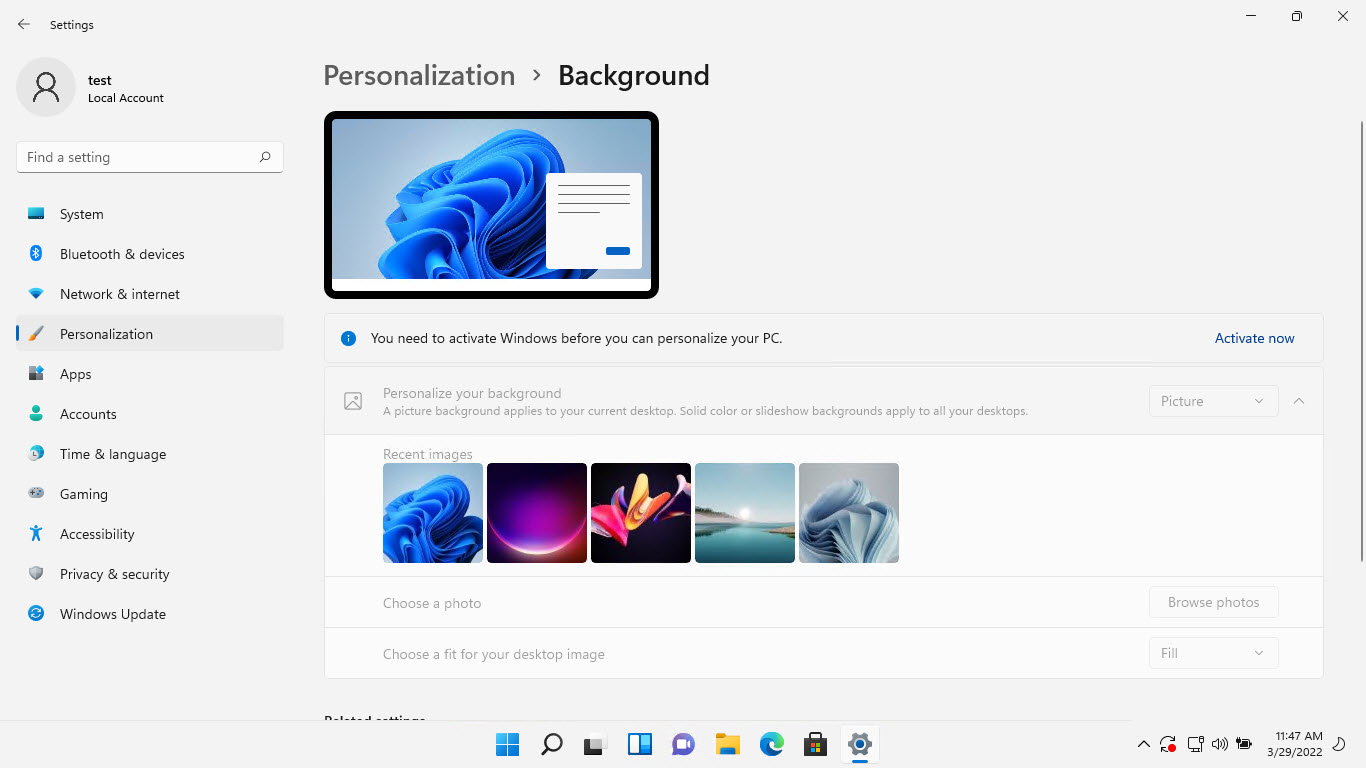
Personalization page එකේ "activate Windows before personalization" message එක.
Method 1 — Set Wallpaper From File Explorer
1. Wallpaper විදිහට ඕන image එක තියෙන folder එක open කරන්න.
2. Image එක මත right-click කරන්න.
3. "Set as desktop background" තෝරන්න.
4. Activation නැතුවත් wallpaper එක වහාම වෙනස් වෙනවා.
Method 2 — Apply a Theme File Directly
1. Windows theme file එකක් (.theme හෝ .deskthemepack) ලබාගන්න, උදාහරණයක් විදිහට Microsoft Store theme files වලින් හෝ විශ්වාසවන්ත source එකකින්.
2. Theme file එක double-click කරන්න.
3. Windows එකෙන් theme එකේ wallpaper, colors, සහ sounds කෙළින්ම apply කරනවා.
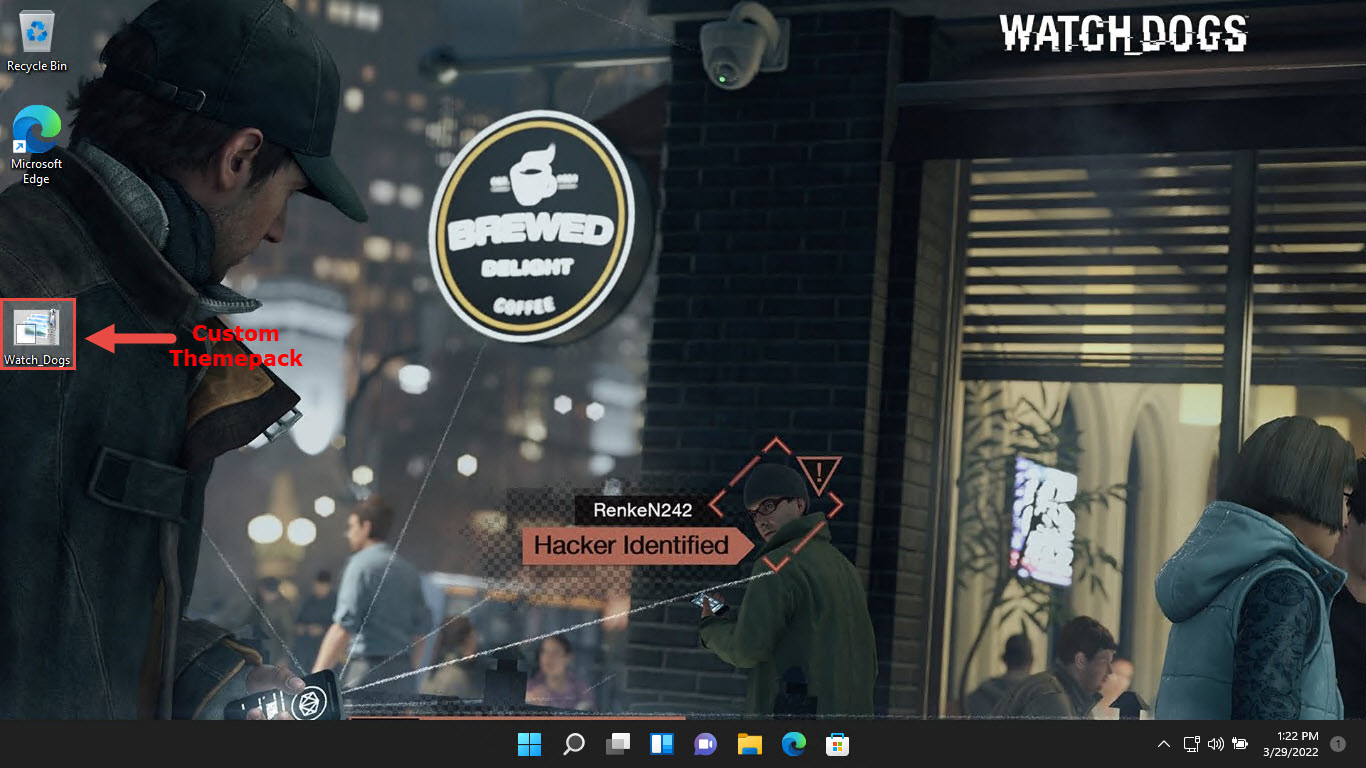
Activate නොවුණු Windows එකක apply කරපු custom theme pack එකක්.
Method 3 — Set Wallpaper in a Browser or Photos
1. Photos app එකේ හෝ browser එකක image එකක් open කරන්න.
2. තියෙන තැන්වල, image එක desktop background විදිහට set කරන්න app එකේ menu option එක පාවිච්චි කරන්න.
3. ඒකෙන් wallpaper changes වලට locked Personalization page එක bypass කරනවා.
Tip: Microsoft Store එකෙන් download කරන themes double-click කරලා apply කරන්න පුළුවන් .themepack/.deskthemepack files විදිහට download වෙනවා.
Troubleshooting
Problem: "Set as desktop background" කිසිවක් නොකරයි.
Solution: වෙනස් image format එකක් (JPG/PNG) try කරන්න, හෝ ඒ වෙනුවට .theme file එකක් apply කරන්න, ඒකෙන් theme එකේ කොටසක් විදිහට wallpaper එක set වෙනවා.
Problem: Accent color සහ lock screen තාම වෙනස් කරන්න බෑ.
Solution: ඒ නිශ්චිත options activation වෙනකම් locked වෙලා තියෙනවා. colors වලට theme files පාවිච්චි කරන්න, නමුත් සම්පූර්ණ control එකට Windows activate කරන්න වෙනවා.
Problem: Restart එකට පස්සේ wallpaper එක reset වෙනවා.
Solution: .theme file එකක් හරහා ඒක apply කරන්න, ඒක persist වෙනවා, කිසිම policy හෝ sync setting එකක් ඒක override කරන්නේ නෑ කියලා තහවුරු කරගන්න.
Problem: ඔයාට full personalization ඕන.
Solution: සම්පූර්ණ Personalization settings page එක unlock කරන්න valid product key එකකින් හෝ digital licence එකකින් Windows activate කරන්න.
Conclusion
Personalization locked වුණත්, File Explorer එකෙන් wallpaper වෙනස් කරන්නත්, theme file එකක් double-click කරලා සම්පූර්ණ themes apply කරන්නත් පුළුවන්. colors, lock screen, සහ තවත් දේවල් වලට සම්පූර්ණ control එකට, Windows activate කරන එකයි නියම fix එක.
About SoftwareKey.lk
මේ guide එක SoftwareKey.lk Knowledge Base එකේ කොටසක්. තව step-by-step IT guides සහ support වලට softwarekey.lk එකට යන්න.