













Autodesk Revit 2026/2025/2024/2023 (1 Device, 1 Year, EDU) Activation
- License validity for 1 year
- Download from AutoDesk™ website
- 24/7 support, 7 days a week
- Best prices on the market
- No external links
- Region
- Global
- Platform
- CAD
- Delivery
- Instant
Any questions about the products? Write to us 24/7 technical support!
Our technical specialists will be happy to answer all your questions!
Description
Download and Activate Autodesk Application
If you don’t have an Autodesk account yet, click “Create Account” and register using the same email. Then click “Install” — once the download starts, you can install and use the 2023, 2024, 2025, or 2026 versions.
This product activate with your Autodesk Account within 48 Hours
Autodesk® Revit® software is built for Building Information Modeling (BIM), helping professionals design, build, and maintain higher-quality, more energy-efficient buildings. Using the information-rich models created with Autodesk Revit software, architects, engineers, and construction firms can collaborate to make more-informed decisions earlier in the design process to deliver projects more efficiently. Any design changes made in Revit models are automatically updated throughout the model, keeping designs and documentation coordinated and more reliable. Autodesk Revit includes features for architectural design, mechanical, electrical, and plumbing, structural engineering, and construction, providing a comprehensive solution for the entire building project team.
Autodesk Revit 2024 Features:
Architectural design
- Conceptual design tools. Sketch and create freeform models and create massing studies.
- Analysis with Insight. Optimize building performance with centralized access to performance data and advanced analysis engines.
- Architectural modeling. Add architectural elements to the building model, including walls, doors, windows, and components.
- Point cloud tools. Connect laser scans directly to the BIM process to author an as-built model.
- 3D design visualization. Explore, validate, and communicate designs. Render more quickly and accurately with Autodesk Raytracer rendering engine.
- Multistory stairs. Quickly create and modify multistory buildings by connecting stairs to the levels in your project.
Structural engineering and fabrication
- Physical and analytical model. Create a physical model for coordination and documentation and an associated analytical model for structural analysis.
- Reinforcement detailing. Create 3D reinforcement designs for cast-in-place and precast concrete structures.
- Structural steel modeling. Model connections with a higher level of detail using a variety of parametric steel connections in Revit or by creating your own custom steel connections.
- Bidirectional linking with analysis. Integrate analysis results into the BIM process and work in an iterative design workflow.
- Linking with structural fabrication. Interoperability between Revit and Advance Steel helps provide a seamless BIM workflow from steel design to fabrication.
- Dynamo for structural engineering. It gives structural engineers tools to develop optimized structural systems using computational logic.
MEP engineering and fabrication
- HVAC design and documentation. Design complex duct and pipe systems to express intent, and model duct and pipe systems with mechanical design content.
- Electrical design and documentation. Design, model, and document electrical systems. Keep track of electrical loads throughout the distribution system.
- Plumbing design and documentation. Create sanitary plumbing systems with sloped piping and layout piping systems to design and document intent.
- MEP fabrication detailing. Create fabrication-ready models in Revit. You can model and coordinate MEP LOD 400 components.
Construction
- Construction modeling. Derive construction insight from design models. Split and manipulate wall layers and concrete pours, and prepare shop drawings for fabrication.
- Construction coordination. Upload Revit models into BIM 360 Glue and sync with BIM 360 Layout. View and share point sets in the BIM 360 Glue web interface or the BIM 360 Layout iPad app.
- Navisworks interoperability. Open a Navisworks coordination model directly in Revit to coordinate your design with the work of teams who use different software.
- Import/Export 2D sheets. Bring AutoCAD files in or out of Revit, and prepare sheet sets for export to fabricators, subcontractors, or other project stakeholders in the format they need.
- Fabrication for MEP engineering. Convert design level-of-detail model elements to fabrication level-of-detail elements for detailed coordination, fabrication, and installation.
[gap]
[title text="HOW TO DOWNLOAD AND ACTIVATE ?"]
From a simple download, products install with the base configuration.
- After purchase and complete your order then sign in to your account at manage.autodesk.com.
- From the All Products and Services tab in Account, select a product and one of the download/install methods (see Download methods).
- If you choose the Install method, your product will download and install in one operation. This method includes product updates.
- If you choose the Download method, run the EXE file (Windows), mount the DMG file (macOS), or extract the TAR file (Linux) associated with your product and version. This method includes product updates.
Note: For Windows, most 2022 and later products use the Autodesk Create Installer.
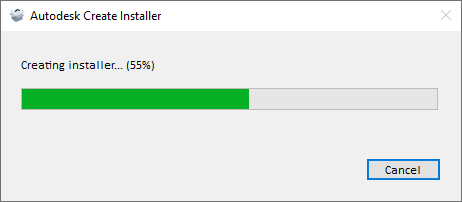
Run the small exe to create the installer in your downloads folder.
-
- If you choose the Direct Download method:
- For a Windows product, run the self-extracting executable file that can be extracted and installed offline.
- For macOS or Linux, use your browser download features.
- If you choose the Direct Download method:
Note: For most products, this method does not include updates.
- Read and accept the license agreement.
- Click Install.
- If you see a Product Language drop-down menu, choose the language that the customer speaks. (If you don't see a Product Language menu, you can download and install a language pack after the product is installed.)
- Optionally replace the default installation path with a new one if the option is available.
- When installation is complete, close the installer or start the product.
Note: When you use the Install or Download method, installation of updates must complete before you can start the product.
Related questions:
what is autodesk revit, what are the features of autodesk revit, what are the system requirements for autodesk revit, how do i activate autodesk revit, how much does autodesk revit cost, where can i buy autodesk revit, how do i download autodesk revit, how do i use autodesk revit, what is the difference between autodesk revit versions, how do i get an educational license for autodesk revit, what type of projects can i create with autodesk revit, how do i become an autodesk revit expert, what are the benefits of using autodesk revit, how do i troubleshoot issues with autodesk revit
Digital Product Terms, Refund & Replacement Policy
Please read the following terms carefully before purchasing and using your digital product.
1. Activation Period
All digital products must be activated within 15 days from the delivery date.
2. Report Activation or Licensing Issues
If you experience any activation, licensing, or product-related issues, please contact our support team within 30 days of the delivery date.
3. No Cancellation After Delivery
Due to the nature of digital products, all digital product sales are final once the product has been delivered. We do not offer cancellations after delivery.
4. Replacement Policy
If the delivered license key is verified to be defective, invalid, or has an activation or licensing issue, we will provide a replacement license key or an equivalent product at no additional cost.
5. Refund Policy
Refunds are provided only if our technical team confirms that the license key is defective or invalid and we are unable to provide a working replacement. All refund requests must be submitted within 30 days of the delivery date and are subject to our verification process.
6. Claims After 30 Days
Refund, replacement, or exchange requests for activation or licensing issues reported more than 30 days after the delivery date cannot be accepted.
7. Customer Responsibility
Customers are responsible for:
- Activating their digital product within 15 days of delivery.
- Verifying that the product is compatible with their device and operating system before purchasing.
- Following the installation and activation instructions provided.
- Contacting our support team promptly if any issues arise.
8. One-Year After-Sales Support
We provide one (1) year of complimentary after-sales technical support from the delivery date. This support includes:
- Installation assistance
- Product activation guidance
- License verification
- Troubleshooting activation and licensing issues
- General technical assistance related to the purchased product
After-sales support does not extend or renew the eligibility period for refunds or replacements. Refund and replacement requests must still be made within 30 days of the delivery date.
Agreement
By purchasing and using our digital products, you acknowledge that you have read, understood, and agreed to these Terms, Refund & Replacement Policy.
ඩිජිටල් නිෂ්පාදන භාවිත නියමයන්, මුදල් ආපසු ලබාදීම සහ ප්රතිස්ථාපන ප්රතිපත්තිය
කරුණාකර ඔබගේ ඩිජිටල් නිෂ්පාදනය මිලදී ගැනීමට සහ භාවිතා කිරීමට පෙර පහත සඳහන් නියමයන් හා කොන්දේසි හොඳින් කියවා අවබෝධ කර ගන්න.
1. සක්රීය කිරීමේ කාලය
සියලුම ඩිජිටල් නිෂ්පාදන භාරදුන් දින සිට දින 15ක් ඇතුළත සක්රීය (Activate) කළ යුතුය.
2. සක්රීය කිරීමේ හෝ ලයිසන්ස් ගැටලු වාර්තා කිරීම
සක්රීය කිරීම, ලයිසන්ස් කිරීම හෝ නිෂ්පාදනය සම්බන්ධ කිසියම් ගැටලුවක් ඇතිවුවහොත්, භාරදුන් දින සිට දින 30ක් ඇතුළත අපගේ සහාය කණ්ඩායම අමතන්න.
3. භාරදීමෙන් පසු ඇණවුම් අවලංගු කිරීම
ඩිජිටල් නිෂ්පාදනවල ස්වභාවය හේතුවෙන්, නිෂ්පාදනය භාරදුන් පසු ඇණවුම අවලංගු කළ නොහැක. භාරදීමෙන් පසු මුදල් ආපසු ලබාදීමක් හෝ ඇණවුම් අවලංගු කිරීමක් සිදු නොකරනු ලබන අතර, පහත සඳහන් ලයිසන්ස් ගැටලු සඳහා පමණක් අපගේ ප්රතිපත්තිය අනුව කටයුතු කරනු ලැබේ.
4. ප්රතිස්ථාපන ප්රතිපත්තිය
ලබාදුන් ලයිසන්ස් යතුර (License Key) වලංගු නොවීම, දෝෂ සහිත වීම, සක්රීය නොවීම හෝ ලයිසන්ස් ගැටලුවක් ඇති බව අපගේ තාක්ෂණික කණ්ඩායම විසින් තහවුරු කළහොත්, අමතර ගාස්තුවකින් තොරව නව ලයිසන්ස් යතුරක් හෝ සමාන නිෂ්පාදනයක් ලබාදෙනු ලැබේ.
5. මුදල් ආපසු ලබාදීමේ ප්රතිපත්තිය
මුදල් ආපසු ලබාදීම සිදු කරනු ලබන්නේ අපගේ තාක්ෂණික කණ්ඩායම විසින් ලයිසන්ස් යතුර දෝෂ සහිත, වලංගු නොවන හෝ සක්රීය කළ නොහැකි බව තහවුරු කර ඇති අතර, ක්රියාකරන ප්රතිස්ථාපන ලයිසන්ස් යතුරක් ලබාදීමට නොහැකි වූ අවස්ථාවලදී පමණි. සියලුම ඉල්ලීම් භාරදුන් දින සිට දින 30ක් ඇතුළත ඉදිරිපත් කළ යුතු අතර, ඒවා අපගේ සත්යාපන ක්රියාවලියට යටත් වේ.
6. දින 30කට පසු කරන ඉල්ලීම්
භාරදුන් දින සිට දින 30කට පසුව වාර්තා කරන සක්රීය කිරීමේ හෝ ලයිසන්ස් ගැටලු සඳහා මුදල් ආපසු ලබාදීම, ප්රතිස්ථාපනය හෝ හුවමාරුව ලබාදිය නොහැක.
7. පාරිභෝගිකයාගේ වගකීම
පාරිභෝගිකයා විසින්:
- ඩිජිටල් නිෂ්පාදනය දින 15ක් ඇතුළත සක්රීය කළ යුතුය.
- මිලදී ගැනීමට පෙර නිෂ්පාදනය තම උපාංගය සහ මෙහෙයුම් පද්ධතිය සමඟ අනුකූලදැයි තහවුරු කළ යුතුය.
- ලබාදී ඇති ස්ථාපන සහ සක්රීය කිරීමේ උපදෙස් නිවැරදිව අනුගමනය කළ යුතුය.
- කිසියම් ගැටලුවක් ඇති වුවහොත් හැකි ඉක්මනින් අපගේ සහාය කණ්ඩායම සම්බන්ධ කරගත යුතුය.
8. වසර 1ක අලෙවියෙන් පසු තාක්ෂණික සහාය
නිෂ්පාදනය භාරදුන් දිනයේ සිට වසර 1ක් නොමිලේ අලෙවියෙන් පසු තාක්ෂණික සහාය (After-Sales Support) ලබාදෙනු ලැබේ. මෙම සහාය තුළ පහත සේවාවන් ඇතුළත් වේ:
- ස්ථාපන (Installation) සහාය
- සක්රීය කිරීමේ (Activation) සහාය
- ලයිසන්ස් තහවුරු කිරීම
- සක්රීය කිරීම සහ ලයිසන්ස් සම්බන්ධ තාක්ෂණික දෝෂ නිරාකරණය
- මිලදී ගත් නිෂ්පාදනයට අදාළ සාමාන්ය තාක්ෂණික සහාය
සටහන: වසර 1ක අලෙවියෙන් පසු සහාය ලබාදීමෙන්, මුදල් ආපසු ලබාදීමේ හෝ ප්රතිස්ථාපනය ලබාගැනීමේ කාලසීමාව දීර්ඝ නොවේ. ඒ සඳහා වන ඉල්ලීම් තවදුරටත් භාරදුන් දින සිට දින 30ක් ඇතුළත ඉදිරිපත් කළ යුතුය.
එකඟතාවය
අපගේ ඩිජිටල් නිෂ්පාදන මිලදී ගැනීම සහ භාවිතා කිරීම මඟින්, මෙම භාවිත නියමයන්, මුදල් ආපසු ලබාදීමේ ප්රතිපත්තිය සහ ප්රතිස්ථාපන ප්රතිපත්තිය ඔබ කියවා, අවබෝධ කරගෙන, ඒවාට සම්පූර්ණයෙන්ම එකඟ වන බව ඔබ පිළිගනී.
No reviews yet — be the first to review this product.
Purchased this product? Log in to review it.
Questions are answered publicly by our team to help other shoppers.
No questions yet — be the first to ask!
Very fast delivery and the license key worked instantly. Excellent support!
Bought Office 2021 and got the key in minutes. Highly recommended.
Genuine keys, great prices, and the activation guide was super helpful.
Best place to buy software licenses in Sri Lanka. Trustworthy!
Why Do Millions of Customers Worldwide Choose SoftwareKey.LK?
Genuine, Authentic Keys
100% genuine, activatable licenses at genuinely competitive prices.
Instant Activation
Get your key by email in minutes and download securely from the official source.
24/7 Dedicated Support
Need help installing or activating? Our technical team is always here to assist.