











Microsoft Outlook 2021 1PC Online Activation (Windows 10 & 11 PC)
Languages: All Languages | License Type: Lifetime for 1 PC | 32-bit & 64-bit Setup Files
Product key and installation instructions are emailed immediately after purchase.
With Outlook you can easily find and organize your e-mails. With a built-i
- Region
- Global
- Platform
- Microsoft Office
- Delivery
- Instant
Any questions about the products? Write to us 24/7 technical support!
Our technical specialists will be happy to answer all your questions!
Description
The new Outlook 2021 is the next step up. With features that perfectly complement the modern lifestyle and work ethics, you can now focus more on enjoying your day and stress less about how to spend it. With new features and an improved experience, Outlook 2021 is the next top email and life management app for getting things done.
Outlook 2021 offers many features that are not in the spotlight, but should be overlooked. With this app you can regain control over many aspects of your life. Use it for business purposes such as emailing or sharing files with co-workers while planning events to organize meetings, or simply for home-use to get a more balanced lifestyle going.
The newest version of Outlook has a ton more functions than just messaging! You’ll find yourself using all these helpful tools whether it’s at home or during your work hours. Tired of using your unreliable phone calendar? Outlook helps you set up meetings, appointments, and more — it automatically sets up a reminder too, without having to think at all!
You’ll have no problem scheduling, taking notes, managing your contacts and getting in touch with people with Outlook’s smart syncing technology either. No matter where you are!
Life is too short to use an email client that doesn’t have all the features you need. You’ll be losing out on time, and important information because some of them are just not as good or comprehensive enough – but don’t worry! There’s always Outlook. With over a million daily users worldwide, it’s the most reliable application to put your trust in.
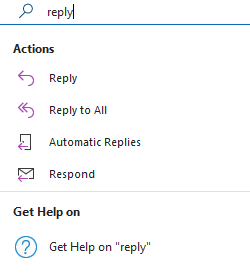
Search Box
The Outlook Search box is similar to the Search box in Word, Excel and PowerPoint but with more options to suit finding email, calendar and contacts.
Limit the search to the current folder and certain sub-folders.
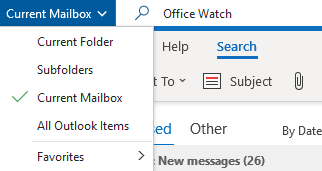
Click on the pull-down icon (right) to see a lot more search refinements.
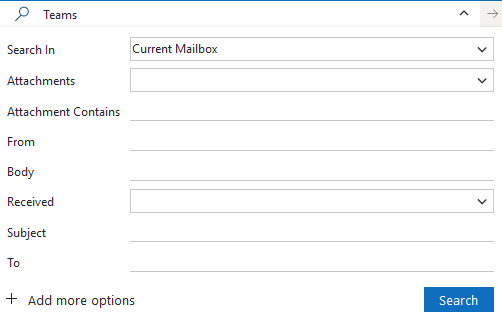
The search box also includes the ‘Tell Me’ help that was also in Outlook 2019.
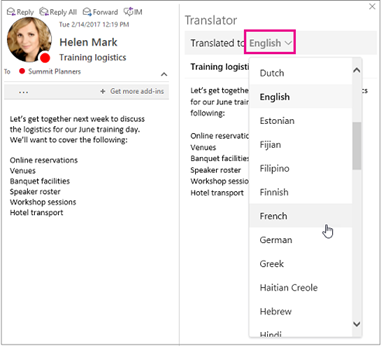
Translator in Outlook 2021
View the transcript of an email message and translate its body into more than 70 languages within Outlook. You will immediately see the translation next to the reading pane in your mailbox.
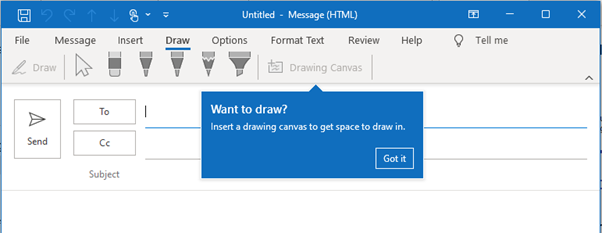
Ink your emails
There’s a Draw tab in the Message Editor to add ‘ink’ to emails. Insert a Drawing Canvas then use the standard drawing tools.
Microsoft Corporation
• One-time purchase for a Windows PC (Not Mac).
• Outlook 2021 Standalone email app.
• Licensed for home and commercial use. All languages are included.
• Compatible with Windows 10/11*
* Go to https://office.com/systemrequirements for compatible versions of Windows 10/11 and for other functional requirements.
[block id="warranty"]
From our download library
Digital Product Terms, Refund & Replacement Policy
Please read the following terms carefully before purchasing and using your digital product.
1. Activation Period
All digital products must be activated within 15 days from the delivery date.
2. Report Activation or Licensing Issues
If you experience any activation, licensing, or product-related issues, please contact our support team within 30 days of the delivery date.
3. No Cancellation After Delivery
Due to the nature of digital products, all digital product sales are final once the product has been delivered. We do not offer cancellations after delivery.
4. Replacement Policy
If the delivered license key is verified to be defective, invalid, or has an activation or licensing issue, we will provide a replacement license key or an equivalent product at no additional cost.
5. Refund Policy
Refunds are provided only if our technical team confirms that the license key is defective or invalid and we are unable to provide a working replacement. All refund requests must be submitted within 30 days of the delivery date and are subject to our verification process.
6. Claims After 30 Days
Refund, replacement, or exchange requests for activation or licensing issues reported more than 30 days after the delivery date cannot be accepted.
7. Customer Responsibility
Customers are responsible for:
- Activating their digital product within 15 days of delivery.
- Verifying that the product is compatible with their device and operating system before purchasing.
- Following the installation and activation instructions provided.
- Contacting our support team promptly if any issues arise.
8. One-Year After-Sales Support
We provide one (1) year of complimentary after-sales technical support from the delivery date. This support includes:
- Installation assistance
- Product activation guidance
- License verification
- Troubleshooting activation and licensing issues
- General technical assistance related to the purchased product
After-sales support does not extend or renew the eligibility period for refunds or replacements. Refund and replacement requests must still be made within 30 days of the delivery date.
Agreement
By purchasing and using our digital products, you acknowledge that you have read, understood, and agreed to these Terms, Refund & Replacement Policy.
ඩිජිටල් නිෂ්පාදන භාවිත නියමයන්, මුදල් ආපසු ලබාදීම සහ ප්රතිස්ථාපන ප්රතිපත්තිය
කරුණාකර ඔබගේ ඩිජිටල් නිෂ්පාදනය මිලදී ගැනීමට සහ භාවිතා කිරීමට පෙර පහත සඳහන් නියමයන් හා කොන්දේසි හොඳින් කියවා අවබෝධ කර ගන්න.
1. සක්රීය කිරීමේ කාලය
සියලුම ඩිජිටල් නිෂ්පාදන භාරදුන් දින සිට දින 15ක් ඇතුළත සක්රීය (Activate) කළ යුතුය.
2. සක්රීය කිරීමේ හෝ ලයිසන්ස් ගැටලු වාර්තා කිරීම
සක්රීය කිරීම, ලයිසන්ස් කිරීම හෝ නිෂ්පාදනය සම්බන්ධ කිසියම් ගැටලුවක් ඇතිවුවහොත්, භාරදුන් දින සිට දින 30ක් ඇතුළත අපගේ සහාය කණ්ඩායම අමතන්න.
3. භාරදීමෙන් පසු ඇණවුම් අවලංගු කිරීම
ඩිජිටල් නිෂ්පාදනවල ස්වභාවය හේතුවෙන්, නිෂ්පාදනය භාරදුන් පසු ඇණවුම අවලංගු කළ නොහැක. භාරදීමෙන් පසු මුදල් ආපසු ලබාදීමක් හෝ ඇණවුම් අවලංගු කිරීමක් සිදු නොකරනු ලබන අතර, පහත සඳහන් ලයිසන්ස් ගැටලු සඳහා පමණක් අපගේ ප්රතිපත්තිය අනුව කටයුතු කරනු ලැබේ.
4. ප්රතිස්ථාපන ප්රතිපත්තිය
ලබාදුන් ලයිසන්ස් යතුර (License Key) වලංගු නොවීම, දෝෂ සහිත වීම, සක්රීය නොවීම හෝ ලයිසන්ස් ගැටලුවක් ඇති බව අපගේ තාක්ෂණික කණ්ඩායම විසින් තහවුරු කළහොත්, අමතර ගාස්තුවකින් තොරව නව ලයිසන්ස් යතුරක් හෝ සමාන නිෂ්පාදනයක් ලබාදෙනු ලැබේ.
5. මුදල් ආපසු ලබාදීමේ ප්රතිපත්තිය
මුදල් ආපසු ලබාදීම සිදු කරනු ලබන්නේ අපගේ තාක්ෂණික කණ්ඩායම විසින් ලයිසන්ස් යතුර දෝෂ සහිත, වලංගු නොවන හෝ සක්රීය කළ නොහැකි බව තහවුරු කර ඇති අතර, ක්රියාකරන ප්රතිස්ථාපන ලයිසන්ස් යතුරක් ලබාදීමට නොහැකි වූ අවස්ථාවලදී පමණි. සියලුම ඉල්ලීම් භාරදුන් දින සිට දින 30ක් ඇතුළත ඉදිරිපත් කළ යුතු අතර, ඒවා අපගේ සත්යාපන ක්රියාවලියට යටත් වේ.
6. දින 30කට පසු කරන ඉල්ලීම්
භාරදුන් දින සිට දින 30කට පසුව වාර්තා කරන සක්රීය කිරීමේ හෝ ලයිසන්ස් ගැටලු සඳහා මුදල් ආපසු ලබාදීම, ප්රතිස්ථාපනය හෝ හුවමාරුව ලබාදිය නොහැක.
7. පාරිභෝගිකයාගේ වගකීම
පාරිභෝගිකයා විසින්:
- ඩිජිටල් නිෂ්පාදනය දින 15ක් ඇතුළත සක්රීය කළ යුතුය.
- මිලදී ගැනීමට පෙර නිෂ්පාදනය තම උපාංගය සහ මෙහෙයුම් පද්ධතිය සමඟ අනුකූලදැයි තහවුරු කළ යුතුය.
- ලබාදී ඇති ස්ථාපන සහ සක්රීය කිරීමේ උපදෙස් නිවැරදිව අනුගමනය කළ යුතුය.
- කිසියම් ගැටලුවක් ඇති වුවහොත් හැකි ඉක්මනින් අපගේ සහාය කණ්ඩායම සම්බන්ධ කරගත යුතුය.
8. වසර 1ක අලෙවියෙන් පසු තාක්ෂණික සහාය
නිෂ්පාදනය භාරදුන් දිනයේ සිට වසර 1ක් නොමිලේ අලෙවියෙන් පසු තාක්ෂණික සහාය (After-Sales Support) ලබාදෙනු ලැබේ. මෙම සහාය තුළ පහත සේවාවන් ඇතුළත් වේ:
- ස්ථාපන (Installation) සහාය
- සක්රීය කිරීමේ (Activation) සහාය
- ලයිසන්ස් තහවුරු කිරීම
- සක්රීය කිරීම සහ ලයිසන්ස් සම්බන්ධ තාක්ෂණික දෝෂ නිරාකරණය
- මිලදී ගත් නිෂ්පාදනයට අදාළ සාමාන්ය තාක්ෂණික සහාය
සටහන: වසර 1ක අලෙවියෙන් පසු සහාය ලබාදීමෙන්, මුදල් ආපසු ලබාදීමේ හෝ ප්රතිස්ථාපනය ලබාගැනීමේ කාලසීමාව දීර්ඝ නොවේ. ඒ සඳහා වන ඉල්ලීම් තවදුරටත් භාරදුන් දින සිට දින 30ක් ඇතුළත ඉදිරිපත් කළ යුතුය.
එකඟතාවය
අපගේ ඩිජිටල් නිෂ්පාදන මිලදී ගැනීම සහ භාවිතා කිරීම මඟින්, මෙම භාවිත නියමයන්, මුදල් ආපසු ලබාදීමේ ප්රතිපත්තිය සහ ප්රතිස්ථාපන ප්රතිපත්තිය ඔබ කියවා, අවබෝධ කරගෙන, ඒවාට සම්පූර්ණයෙන්ම එකඟ වන බව ඔබ පිළිගනී.
Helpful guides
No reviews yet — be the first to review this product.
Purchased this product? Log in to review it.
Questions are answered publicly by our team to help other shoppers.
No questions yet — be the first to ask!
Very fast delivery and the license key worked instantly. Excellent support!
Bought Office 2021 and got the key in minutes. Highly recommended.
Genuine keys, great prices, and the activation guide was super helpful.
Best place to buy software licenses in Sri Lanka. Trustworthy!
Why Do Millions of Customers Worldwide Choose SoftwareKey.LK?
Genuine, Authentic Keys
100% genuine, activatable licenses at genuinely competitive prices.
Instant Activation
Get your key by email in minutes and download securely from the official source.
24/7 Dedicated Support
Need help installing or activating? Our technical team is always here to assist.